Simple Tab Renamer (Chrome extension)
Simple Tab Renamer a lightweight Chrome extension that lets you define a few find → replace rules and automatically applies them to your open tabs.
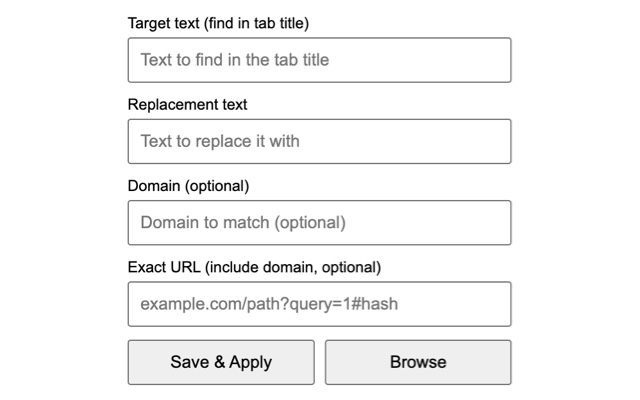
What it does
The extension injects a small script into matching tabs and updates document.title based on your rules.
- Target text — the substring to find in the current tab title (
document.title) - Replacement text — what to replace it with (can be empty)
- (optional) Domain — apply only on a specific domain (e.g.
github.com), or leave empty to apply everywhere - (optional) Exact URL — apply only when the full URL matches exactly (domain + path + query + hash)
Features
- Rule-based renaming (simple text replacement)
- Domain scoping (optional)
- Exact URL scoping (optional)
- Persists rules via
chrome.storage.local(survives restarts) - Auto-apply on install, browser startup, tab creation, and tab updates
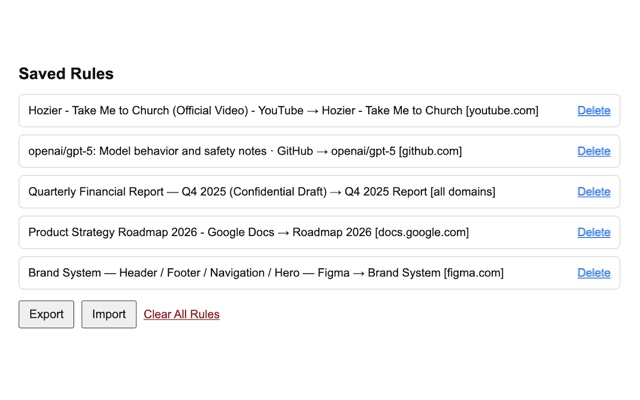
- Rules manager page with delete, import/export JSON, and clear-all
Installation (Chrome Web Store)
Install the extension directly from the store Chrome Web Store.
Installation (developer mode)
- Download/clone the GitHub project.
- Open Chrome and go to
chrome://extensions. - Enable Developer mode.
- Click Load unpacked.
- Select the extension folder (the one containing
manifest.json).
Usage
Create a rule
- Click the extension icon.
- Fill in Target text and Replacement text.
- Optionally add Domain and/or Exact URL.
- Click Save & Apply to apply immediately to currently open tabs.
Manage rules
- Click Browse in the popup to open the Saved Rules page.
- From there you can delete rules, import/export JSON, or clear all rules.
Import / export
The Rules page exports a JSON file containing a rules array. During import, rules are sanitized and duplicates are skipped.
Privacy
Rules are stored locally in your browser using chrome.storage.local.